# ALGE-Timing Devices
The following devices are supported:
* ALGE-Timy in most programs, e.g. Backup or PC-Timer
* TDC 8000/8001 by selecting ´ALGE-Timing Timy (Backup)´ as timing device
FDS devices can also work with the ALGE-Timing protocol.
### Configuration
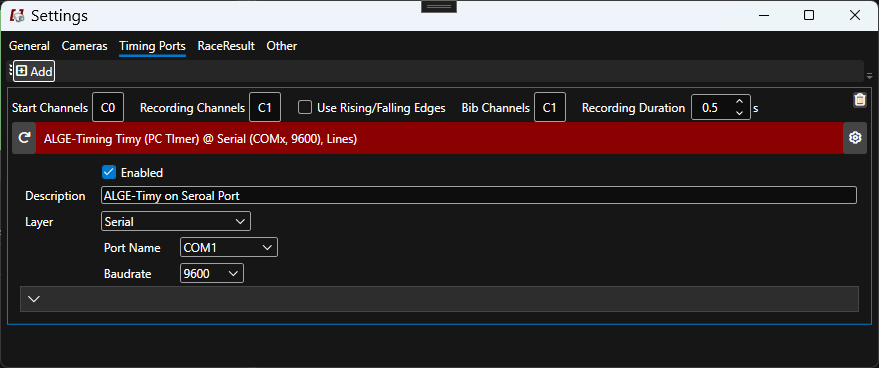
ALGE-Timing channels range from C0 to C9, usually being C0 the start and C1 the finish. The meaning of each setting is described [here](https://dbnetsoft.github.io/IDCamProDocumentation/configuration/timingdevices/).
| Key | Values | Default |
| ----------------------- | -------------- | ------- |
| Start Channels | `C0`-`C9` | `C0` |
| Recording Channels | `C0`-`C9` | `C1` |
| Bib Channels | `C0`-`C9` | `C1` |
| Use Rising/Falling Edge | `true`/`false` | `false` |
{% hint style="info" %}
Rising/falling edge should be enabled (checked) when expecting longer finish passings close to each other. This way the recording only stops on the last release of the light beam.
{% endhint %}
---
# Agent Instructions: Querying This Documentation
If you need additional information that is not directly available in this page, you can query the documentation dynamically by asking a question.
Perform an HTTP GET request on the current page URL with the `ask` query parameter:
```
GET https://docs.dbnetsoft.com/idcampro/configuration/timing/alge-timing-devices.md?ask=
```
The question should be specific, self-contained, and written in natural language.
The response will contain a direct answer to the question and relevant excerpts and sources from the documentation.
Use this mechanism when the answer is not explicitly present in the current page, you need clarification or additional context, or you want to retrieve related documentation sections.