> For the complete documentation index, see [llms.txt](https://docs.dbnetsoft.com/dbnetsoft/llms.txt). Markdown versions of documentation pages are available by appending `.md` to page URLs; this page is available as [Markdown](https://docs.dbnetsoft.com/dbnetsoft/raceresultexchange/operation-modes/displayboard/displayboard-brands/alge-timing-gaz-d-line/scripting/clock-runtime-gaptime.md).
# Clock, Runtime, Gaptime
### Show clock before start, runtime after start and gap time after winner finish
The following script allows to show the current clock before the start of the race, a runtime during the race and a gap time to winner as soon as the first athlete finishes.
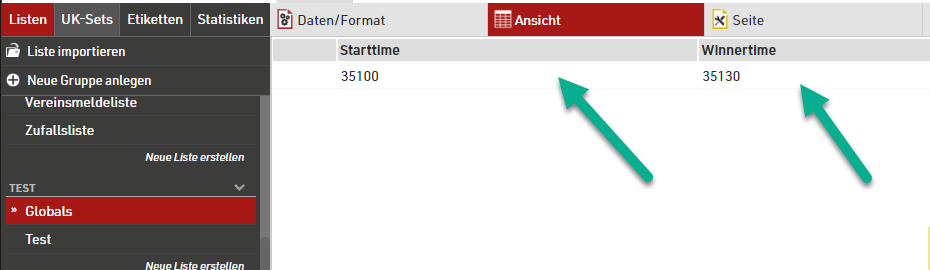
This can be achieved by having the race start TOD and the winner TOD available in a RR12 list. The actual content of these values depend on your event file setup.
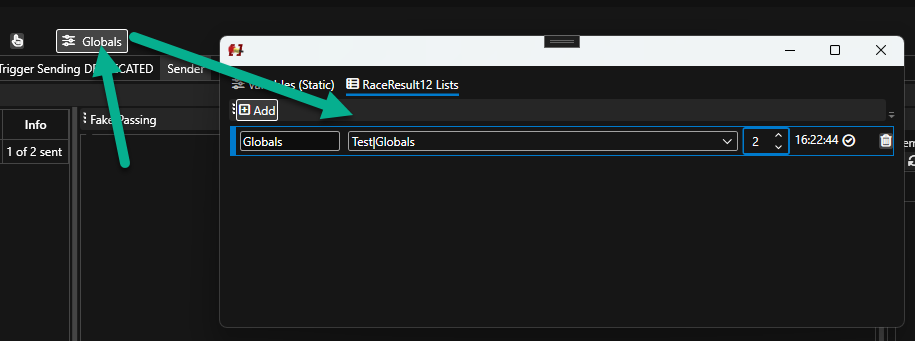
This list is then pulled via RRExchange globals feature periodically into the software.
The pulled global list entries are available as variables in each script then. They are identified by .First., e.g. `Globals.First.Starttime` for a RR12 field named `Starttime` in a globals list `Globals`.
```
{{
# Get current TOD and convert to seconds
now = timespan.Now | ToSeconds
# Fetch race start time and winner time from Globals List and convert to seconds (this way RR12 field can be seconds or HH:mm:ss string
raceStartedAt = Globals.First.Starttime | ToSeconds
winnerFinishedAt = Globals.First.Winnertime | ToSeconds
# Determine race states
isRaceStarted = raceStartedAt > 0
# Determine output based on is race started or not
if isRaceStarted
# Race is started, check for winner time is present
isWinnerFinished = winnerFinishedAt > 0
if (isWinnerFinished)
# Winnner is finished, show gap time
# Calculate gap time
timeSinceWinner = now - winnerFinishedAt
timeSinceWinner | gaz.Format "Seconds" false
else
# No winner present, show running time
# Calculate runtime
timeSinceStart = now - raceStartedAt
# Display formatted
timeSinceStart | gaz.Format "Seconds" false
end
else
# Before Start
""
end
}}
```